Use SpeechSynthesis and SpeechRecognition on Browser
Web Speech API を使えば、ブラウザ上で音声合成と音声認識が出来る時代らしいです。
Safari と Chrome で音声合成が利用できます。Chrome ならさらに音声認識も利用できます。
手軽に利用できるように、WebModule ベースの Speech.js Module を作ってみました。
| iOS Safari | Chrome for Android | PC Chrome | Electron | NW.js | |
|---|---|---|---|---|---|
| 音声合成 | OK | OK | OK | OK | OK |
| 音声認識 | OK | OK | OK | OK |
こんな感じで使います (ボイスコマンド部分は3分で実装した感じのアレなコードです)
var speech = new Speech().load({ name: /Kyoko/i, lang: /ja/i }); // ボイスのロード
var recognizer = new Speech().createRecognizer(); // 音声認識

// この辺は適当に
var voiceCommandMap = {
    "clear":    _clearBuffer,
    "stop":     _stopRecognition,
    "クリア":   _clearBuffer,
    "ストップ": _stopRecognition,
    "終了":     _stopRecognition,
    "しゅうりょう": _stopRecognition,
};

function _startRecognition() {
    console.info("start");
    if (speech.ready) { speech.say("お話しください"); }

    recognizer.start(function(event) {
        switch (event.type) {
        case "result":
            if (this.ended) {
                console.log("ok: ", this.result.join(","));
                _processVoiceCommand(this.result[this.result.length - 1].trim(), voiceCommandMap);
                alert(this.result.join(","));
            } else {
                console.log("...", this.buffer.join(","));
            }
            break;
        }
    });
}

function _processVoiceCommand(command, voiceCommandMap) {
    for (var keyword in voiceCommandMap) {
        if (keyword === command) {
            var fn = voiceCommandMap[keyword];
            if (fn) {
                fn();
            }
        }
    }
}

function _stopRecognition() {
    if (speech.ready) { speech.say("音声認識を終了しました"); }
    recognizer.stop();
    console.info("stopped");
}

function _clearBuffer() {
    if (speech.ready) { speech.say("バッファをクリアしました"); }
    recognizer.clear();
    console.info("buffer cleared");
}
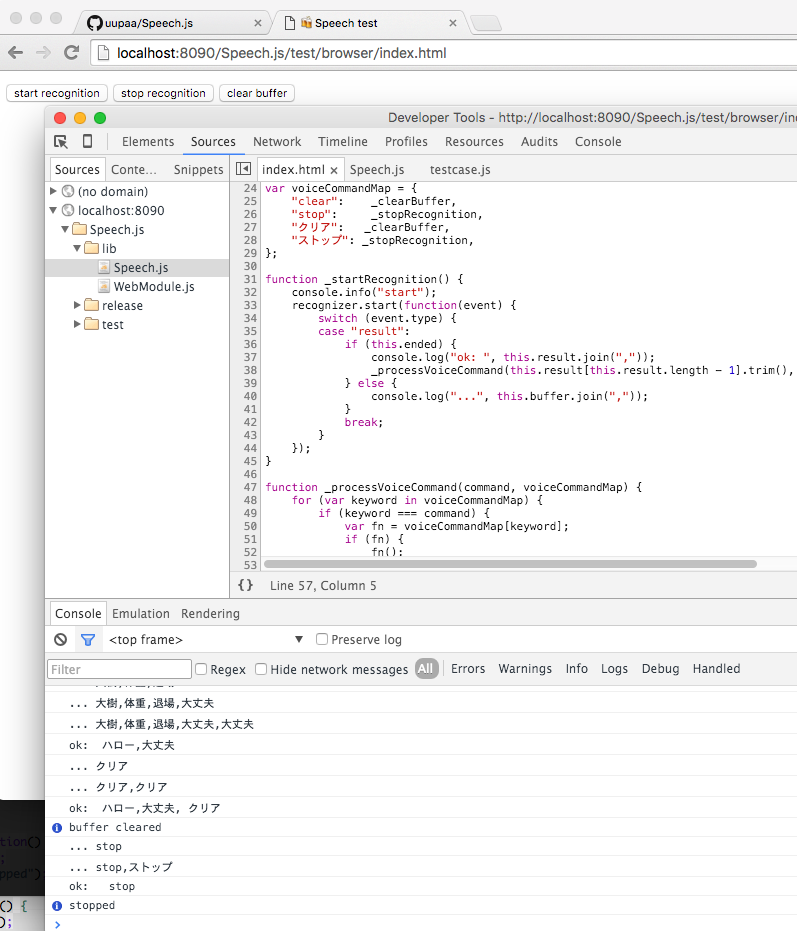
夢が広がりますね。
